Making a Puzzle from Your Own Photo: What Works and What Doesn't
Published
A pet photo sleeping in your phone’s album, a travel photo, a picture of a drawing your child made. Any of them can be turned into a jigsaw puzzle and solved as is.
But after a few tries, you quickly notice that photos differ quite a bit as puzzles. Some photos go smoothly even at 24 pieces, while others, at the same 24 pieces, feel frustrating. Here is where that difference comes from.
Your photo never leaves your device
Let’s start with this. The photo you choose is processed only inside your browser and is not sent anywhere. This site is a static website, so there is no server to receive the file at all. The photo is loaded briefly into browser memory and disappears the moment you close the tab or choose another photo. In this mode, puzzle progress is not saved either.
So it is fine to use a family photo you would rather not show anyone.
Photos that make good puzzles
It helps when different things are spread across the picture. The fun of a puzzle comes from telling pieces apart, so the more elements of different colors and shapes are scattered here and there, the more enjoyable it is. Think of a photo of a garden, a bookshelf, or a table set with several plates of food.
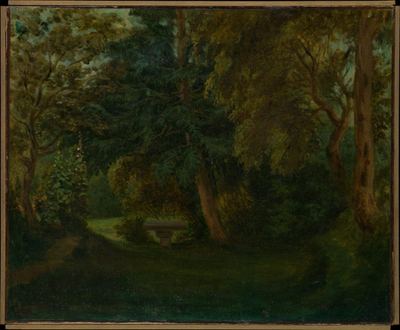 Solve this painting as a puzzle → about 5 minutes on Easy
A painting like George Sand’s Garden at Nohant makes a good puzzle for the same reason.
It also matters that the subject fills the frame generously. A photo taken from far away, where the person appears tiny, is hard because everything else is background. For a pet, choose a photo where its face and body take up more than half the frame.
The focus needs to be sharp, too. In a blurry photo, the clues at the piece edges get smeared. Even if it looks fine to the eye, the difference becomes obvious once it is cut into pieces.
Landscape-orientation photos have a slight advantage. The puzzle board sits in the middle of the screen and the pieces are scattered around it, and a wide photo fits this layout well, leaving plenty of room to lay out pieces. Portrait-orientation photos work too, of course, but the margins on the left and right get narrower.
Skies, white walls, and shiny things
Photos with a lot of sky are tricky. Pieces that are only blue sky all look the same, so you run into exactly the problem covered in Strategies for puzzles with large solid areas. If the sky takes up more than a third of the picture, lower the piece count. Portraits taken in front of a white wall or a plain background are similar. You finish the person quickly, then wander through the background for a long time. Snowy landscapes and misty seas are pretty to look at but very hard as puzzles.
Be careful with photos that have a lot of reflections, too. With many windows, water, or metal surfaces, the brightness jumps around unpredictably.
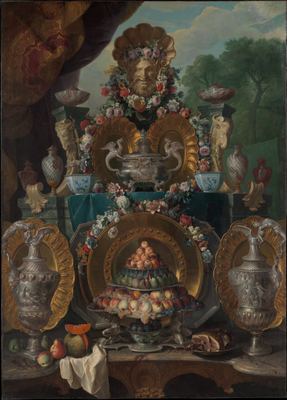
Think about why Still Life with Silver is tricky and you will get the idea. Of course, the harder it is, the more satisfying it is to finish. Screenshots and photos of documents are even worse. They are nothing but text and lines, so every piece is black lines on a white background and they are almost impossible to tell apart.
Start with 24 pieces
It is a good idea to try a newly uploaded photo once at Easy (about 24 pieces). When you get a feel for it, raise the piece count; pressing a difficulty button rebuilds the puzzle right away with the same photo. Be sure to turn on the preview as well. You may think you know your own photo by heart, but you will remember individual pieces less than you expect, and the grid overlaid on the preview is especially useful. If you get stuck, use a hint. It places one piece in its correct spot, filling in from the top left of the finished picture, so your flow is not broken. Files over 20MB will not open. Most phone photos these days are under 5MB, so this rarely comes up, but files converted from original RAW images may hit the limit.
Seeing a travel photo again at 300 pieces
The same photo looks surprisingly different when you play it at a different difficulty. At 24 pieces you see the photo as large blocks; at 300 pieces you look closely at every brushstroke, every single hair.
When you assemble a travel photo at 300 pieces, things you passed by at the time catch your eye: the letters on the corner of a sign, someone sitting at the next table, the color of the sky that day. The “power to make you look slowly” I mentioned in How to choose landscape puzzles is not only found in masterpieces; it works just the same on a photo you took yourself.