Setting Up So Long Online Puzzle Sessions Don't Tire You Out
Published · updated
When you get up after finishing a puzzle, your eyes feel dry and your neck is stiff. That is because it is a hobby where, once you start, you sit without moving for 30 minutes to an hour. When you find yourself wondering why your eyes are so tired, the cause is often your surroundings rather than your skill or concentration. A few adjustments make the same amount of time much more comfortable.
The bigger the screen, the better
It may sound obvious, but the difference is large. The bigger the pieces appear, the easier it is to see small differences in color and texture, and the more precise your hand becomes when dragging and dropping.
A desktop monitor is the most comfortable. Each piece appears generously large. A tablet has the pleasure of touching pieces directly with your finger and strikes a good balance somewhere in between. A smartphone is fine for a light game on the go, but difficulties that make the pieces small are not recommended. It is better to go one or two levels lower to suit the screen size.
On narrow screens and small touch devices, Expert (about 300 pieces) cannot be selected at all. That is because 300 pieces laid out on such a screen would be too small to pick up with a finger.
Piece size is set automatically to fit the screen. Allowing for the margin around the board where pieces are laid out, the side of a piece is the smaller of two values: the width of the puzzle area divided by (number of columns + 3), and the height divided by (number of rows + 3). It never goes below 32px. If you calculate for a painting slightly wider than it is tall, with a puzzle area about 500px high, a piece side comes out a little over 70px at Easy, 55px at Normal, and around 40px at Hard. Expert comes out at 28px and hits the 32px minimum; in that case the workspace becomes larger than the screen, and you solve it by dragging to move around.
So it is often the screen’s height, not its width, that determines piece size. If you use the browser in full screen (F11 on Windows), the board grows by the space the address bar and tab strip were taking up.
If you can’t change the screen, change the puzzle
If you cannot change the screen, adjust on the puzzle side. Zoom in with the + button (spread two fingers on a touch screen), and after zooming, drag an empty area to move the view. Pressing the original-size button brings you back in one step. At first, build large sections at the original size and zoom in only for the final detail work, so you don’t lose sight of the whole board.
One more thing for touch screens. Moving your finger on the puzzle board moves only pieces; the page does not scroll. To scroll the page, swipe on the title bar or the margin below, outside the puzzle board.
When you turn on the preview, it appears in its own space so it does not cover pieces. On a wide screen it sits to the right of the puzzle board, and on a very narrow phone screen it is placed horizontally above the board. It is for a quick glance to compare when your eyes get confused by a dark painting. If your wrist, more than your hand, is the problem, Solving puzzles without a mouse explains how to play with a keyboard.
If the room is dark, lower the screen too
Staring at a bright screen in a dark room tires the eyes quickly. The point is to reduce the difference in brightness between the screen and its surroundings: a slightly brighter screen in the daytime, and at night, soft lighting in the room with the screen turned down.
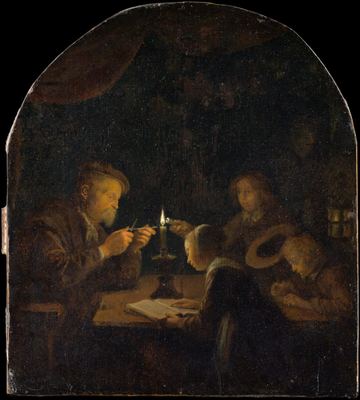 Solve this painting as a puzzle → about 5 minutes on Easy
However, many masterpiece puzzles are dark paintings, so if you lower the screen brightness too much, telling pieces apart becomes difficult in the first place. Paintings lit by a single candle, like An Evening School, are like that. Such paintings need the brightness raised a little to be seen properly.
There is a trap on the other side as well. A work painted only in gradations of ink, like Bamboo in the Wind, is not dark, but the differences between pieces are very subtle, so if you lower the brightness too much, those subtle differences are the first to blur. A spot where a window or lamp reflects on the screen causes the same problem.
Look into the distance once every 20 minutes
When you look at a nearby screen for a long time, the muscles that focus your eyes stay tense the whole while. Looking out the window or at a far wall for a moment about every 20 minutes is common advice. People may feel the effect differently, but it costs nothing.
In When a puzzle won’t come together, I also wrote that a short break works surprisingly well. While you rest your eyes, it is a good chance to shake off a board you are stuck on. Progress is saved automatically, so you can simply get up.
Just keep an eye on the clock. The clock stops when you switch to another tab, but it keeps running if you leave with the same tab open. If it is a game you want a record for, press pause before you get up. The picture is hidden and the clock stops, so when you come back, just press Resume.
Take the laptop off your lap
The most tiring posture is a laptop on your lap with your head bent down. Raise the screen close to eye level, and keep your hands at a height where your elbows rest naturally at your sides. If you use a mouse, keeping your wrist on the desk and moving with your whole arm puts less strain on the wrist.
If you hold a tablet in your hand, one hand has to support the device the whole time. Standing it up with a stand or case frees both hands and means you bend your neck less. As I said in Why puzzles are good for seniors, it has to be easy to handle for you to enjoy it for a long time without strain.
Playing with a keyboard uses your wrist less but makes it easy to stay frozen in one posture for a long time. If you choose that route, be a bit more diligent about the 20-minute breaks. The painting will still be there tomorrow, but whatever you spare your neck and eyes today, they will thank you for tomorrow.