How to Move Puzzle Pieces with Only a Keyboard, No Mouse
Published
A jigsaw puzzle is a game of picking up pieces and dragging them into place. That is why most online puzzles cannot even be started without a mouse or a finger.
Here, you can solve a puzzle from start to finish with only the keyboard. It was made for when your wrist hurts, when it is hard to drag pieces precisely with a laptop trackpad, or when you cannot use a mouse at all.
A few keys are all it takes
First, use the Tab key to move to the puzzle board. When the board is selected, a blue outline appears around its edge. That is where you start.
| Key | What it does |
|---|---|
| Space | Select a piece (each press moves to the next piece) |
| Shift + Space | Go back to the previous piece |
| Arrow keys | Move the selected piece up, down, left or right |
| Shift + Arrow keys | Move it in very small steps |
| Esc | Deselect |
The selected piece gets a light blue border. When it comes close to its correct position, the border turns orange. The colors are clearly different, so there is no confusing them. Light blue is the piece you are holding now; orange is the signal that it is almost in place.
Big strides, then small steps
Each press of an arrow key moves the piece half a cell. That is about what it takes to avoid frustration when moving a piece to the other side of the screen.
Hold Shift as well and it moves one eighth of a cell at a time. This is the step for finishing touches. After moving a piece roughly into position, you need to nudge it slightly so it locks snugly with its neighbor.
In practice, the sequence goes like this. Stride toward the target with the arrow keys, watch whether the border turns orange, then hold Shift and nudge it in a little at a time. When pieces touch, they join on their own.
Space cycles in the order of the finished picture
Keep pressing Space and the pieces are selected one after another. This order follows each piece’s position in the finished picture, regardless of where it currently sits on the screen. It starts with the upper-left piece and goes around to the lower right.
If the order were based on screen position, it would get shuffled every time a piece was moved. Then, as you pressed, some pieces would be skipped and some would come up twice. Someone using only a keyboard might never reach a particular piece. The order based on the finished picture stays the same throughout the game, so no matter how many times you press, it goes around every piece without missing any.
Following along with a screen reader
Each time you select a piece, a spoken message such as “Selected piece 3 of 21” is announced. It also reads out when you press hint or deselect. You can keep track of which piece you are holding by sound alone.
Start with 24 pieces and a picture with strong contrast
Honestly, solving 300 pieces by keyboard takes a fair amount of patience. It is best to start with 24 or 48 pieces.
Pictures with strong contrast in color and shape work better.
 Solve this painting as a puzzle → about 5 minutes on Easy
With an oil painting of clear light and dark like Christ Asleep during the Tempest, a single piece is enough to guess which area it belongs to.
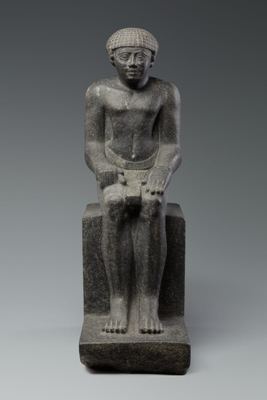
A work that is all similar stone color, like an Egyptian statue, is the opposite. It is hard even with a mouse, and harder by keyboard.
Easier on the wrist, same posture
Using the keyboard spares your wrist, but you still sit in the same posture for a long time. The screen height and break intervals discussed in setting up for long sessions without fatigue apply here just the same. If you want a break, press the pause button. The clock stops, and you can pick up where you left off when you come back. Whatever way is comfortable for your hands, if you can finish the puzzle, that is enough.