Why Jigsaw Puzzles Make a Good Hobby for Seniors
Published · updated
Ten minutes after lunch, another ten before the evening news. A jigsaw puzzle is a hobby you can do a little at a time like that. People of all ages have enjoyed it for a long time, and while no particular benefit can be promised, it suits seniors in that it is easy to start without pressure. Here are the reasons, matched to the actual features of the puzzles on this site.
As much as you like, at your own pace
There is no set time and there are no rules. You can stop after just 10 minutes, and since your progress is saved automatically, you can pick up where you left off next time. If a piece won’t come, you can leave it for later and move on to another spot. Just go at your own pace.
Your game is saved every time you move a piece, along with the time spent so far. One thing to keep in mind is that it is saved in the browser on that device. You can’t continue a game started on the living-room tablet from the computer in the bedroom.
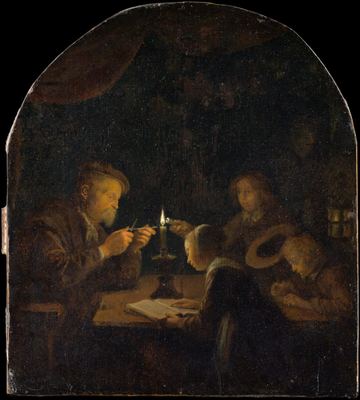
A game in progress on Easy and one on Normal are kept separately, and their records are kept separately too. So moving up one level at a time with the same picture is less of a burden. If you reopen An Evening School, which you finished once on Easy, at Normal (7×8, 56 pieces), you already know which corners are dark when you start.
The timer that stays on screen may bother you. It starts the moment you touch the first piece and stops when you switch to another tab. When you step away with the screen still open, press pause; the picture is covered and the timer stops too. If you have no interest in competing on time, you can simply not look at it. Even if you accidentally press reshuffle, a confirmation box appears first if you have assembled any part, warning that it will be lost.
If you’d like a small fixed point in your day, Today’s Puzzle is worth a try. One work is set for each day, so there is no effort in choosing, and the number of consecutive days you’ve completed adds up as a figure. This is a hobby where nothing happens if you skip a day. If the count breaks, you just start building it up again.
If the screen is uncomfortable, use paper
If handling pieces with your fingertips on a small screen is uncomfortable, you can also print the printable version large and cut it out on paper. Holding pieces in your hand and fitting them together feels different from the screen.
Before moving to paper, there are also things you can adjust on screen. The fewer the pieces, the larger they appear, so Easy (about 24 pieces) is the easiest to handle. If the pieces look small, zoom in with the + button, and after zooming in, drag an empty spot to move the view. If a mouse or touchpad is hard to use, you can select the puzzle board with Tab, pick up a piece with Space, and move it with the arrow keys. This method is described separately in the keyboard play guide. On touch devices with small screens, the 300-piece difficulty is blocked from being selected at all, so there is no chance of accidentally choosing pieces that are too small.
You end up looking at the painting for a long time
 Solve this painting as a puzzle → about 5 minutes on Easy
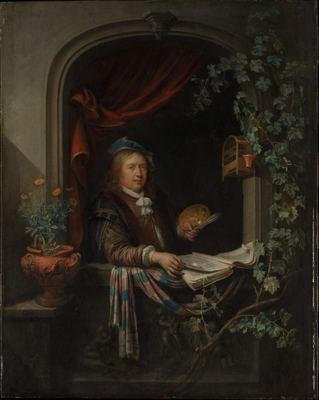
As you assemble An Evening School, a calm interior scene, or Self-Portrait, where your eye is drawn to the sitter’s expression, you naturally end up looking at the painting for a long time. Without going to a museum, you get time to look slowly at a masterpiece. That is the greatest charm of this hobby.
The two paintings are quite different in character. An Evening School is an evening classroom lit by a single candle, and the original is a small panel only 25 cm tall. More than half the picture is close to black, so even on Easy (5×5, 25 pieces) it is no pushover. Start with the bright pieces around the candle, such as the faces, books, and hands, and judge the dark pieces by subtle differences in their brownish tinge with the preview turned on, and a way through appears. Self-Portrait is the opposite. Beside the painter holding his palette are a birdcage, a grapevine, a flowerpot, and books, so every piece has a clue. It is good for stepping up to Normal (6×8, 48 pieces) and assembling it by finding the objects one by one.
Below each puzzle page is a commentary on the painting, which you can open and read during a break from assembling. Press “Show artwork details” to see the original’s size, materials, and how it entered the collection.
Side by side with your grandchildren
We recommend sitting side by side with your children or grandchildren and assembling the same picture. As mentioned in a first puzzle with your child, hobbies that people of every generation can do together, as long as the difficulty is right, are rarer than you might think.
Taking turns with one screen works well. While one person moves pieces, the other keeps the preview on and helps out with “I think that one goes top right,” so waiting for your turn isn’t boring either. With family who live far away, you can solve Today’s Puzzle on the same day and share your impressions. The work changes at midnight Korea time, and everyone who opens it gets the same picture. More ideas like this are in doing puzzles together as a family over the holidays.
Since it is a hobby that keeps you seated for a long time, it’s also worth checking the screen height and lighting. That is covered in setting up so you don’t get tired. A puzzle is a game with no reason to hurry. A picture you didn’t finish today will be waiting in the same place tomorrow.
Frequently asked questions
What difficulty is best for a senior starting jigsaw puzzles?
Easy (about 24 pieces) shows the pieces largest, so they are easiest to handle. Moving up one level at a time with the same picture is less of a burden: if you reopen a picture you finished on Easy at Normal, you already know which corners are dark when you start.
What if the pieces on the screen are too small to see?
Zoom in with the + button and drag an empty spot to move the view. If a mouse or touchpad is hard to use, there is also keyboard play: select the puzzle board with Tab, choose a piece with Space, and move it with the arrow keys. If that is still uncomfortable, you can print the printable PDF large and assemble it on paper.
The timer bothers me. Can I turn it off?
The timer starts the moment you touch the first piece and stops when you switch to another tab. When you step away, press pause; the picture is covered and the timer stops. If you have no interest in competing on time, you can simply ignore it, and your progress is saved automatically every time you move a piece.