Why Sorting Pieces by Color Works Even Better in Online Puzzles
Published · updated
Box lids, plates, rice bowls. If you have ever done a physical puzzle, you have probably pulled bowls out of the kitchen to sort pieces by color. It clearly works, but there is one catch. You need a big table. Once you go beyond five or six colors, you quickly run out of room.
The empty space on the screen is your desk
In a digital puzzle, you can enlarge and shrink the canvas as you like and scatter pieces around for a while. Simply gathering them loosely in empty space, along the lines of “this one’s for later” and “this one goes near the face,” has much the same effect as sorting them into bowls with a physical puzzle. And you never lose a piece.
Here there is one more thing. When you open a puzzle, the spot for the finished picture sits empty in the middle of the screen, and the pieces are lined up around it with almost no overlap. Room to stack piles and a layout that lets you scan the pieces at a glance are laid out from the start. Every time you move a piece, its position is saved in your browser, so the piles you sorted stay as they are. That means you can pick up in the evening with the color piles you split up at lunch. With a physical puzzle, ten plates would have taken over the dining table all day. Resuming only works on the same device and in the same browser.
Of course, the desk can be no bigger than the screen. On a narrow screen like a phone, the pieces get so small that the Expert (about 300 pieces) difficulty cannot be selected at all.
Sky colors at the top, shadows at the bottom
Don’t stack the color piles just anywhere; place them around the board according to where they are in the picture. Sky-colored pieces go in the top margin, ground and shadows in the bottom margin, and the colors of an object on the left in the left margin. Then the distance you drag from pile to board gets shorter, and the arrangement of the piles itself becomes a rough map of the picture. If you turn on the preview, the original appears beside the canvas (above it on a narrow screen), which also makes it easy to compare piece colors.
The board tells you whether your sorting was right. Drag a doubtful piece to the matching area of the board, and when it comes within about a third of a piece’s size of its correct spot, its outline turns orange. If a neighboring piece has already been placed, only the right piece will snap on; a wrong piece will not attach even if its shape looks plausible. This is how pieces mistakenly mixed into a pile get filtered out.
Two similar piles, such as dark brown and dark green, look like one color on a zoomed-out screen. Separate that border by zooming in. Zoom goes up to 3x, so don’t hold back when sorting.
A black background and a pearl necklace
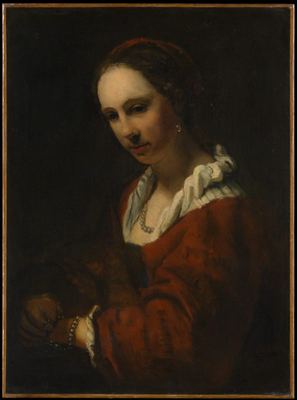 Solve this painting as a puzzle → about 5 minutes on Easy
Color sorting works most satisfyingly with paintings that have strong contrast. In Young Woman with a Pearl Necklace, light skin and pearl jewelry float in front of a dark background, so simply separating the background from the figure first makes it go much more smoothly. The flesh tones of the face and hands, the red garment, and the white collar of the undergarment each become a pile. More than half the picture is black, so the black pile is the largest, and if you set aside the pieces within it that have a slight reddish tinge, you can pull them out right away when joining pieces along the outline of the clothing.
When there is no color, sort by material
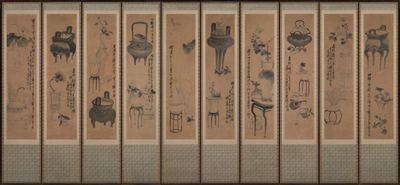
Still life with bronze vessels and flowering plants is a photograph of an entire ten-panel folding screen, and the painting has almost no color. That does not mean you have to give up on sorting. Look at the materials instead of the colors. A little more than the bottom fifth of the picture is gray-green patterned fabric, so if you play it on Hard (15×7, 105 pieces), some 20 pieces are nothing but this pattern. A cream-colored band runs around the painting, inside it is a brown paper ground, and on top of that sit dark ink depicting the bronze vessels and light ink used for the flowers and calligraphy. Fabric, band, paper, dark ink, and light ink give you five piles.
Even so, some pieces will not sort no matter what. As I said in how to choose a difficulty, the more large single-colored areas a picture has, the less color sorting helps. In this screen, that is the brown paper ground. It has the most pieces, and they all look alike. For the parts painted in ink, you can switch your criteria to brushstroke direction or tone (dark and light), but blank paper does not even offer such clues. Pick out the pieces that calligraphy passes through, the pieces where ink has bled, and the pieces touching the cream band first, and fit the remaining bare paper pieces in last by looking at the shapes of the empty spots.
Once you get used to managing piles on the screen like this, you start to miss the physical puzzle, with its plates spread across a big table. I compared what changes when you print the same picture on paper and put it together in the post comparing online and print.
Frequently asked questions
Does sorting pieces by color work in online puzzles too?
It does. The empty space on the screen is your desk, so you can spread out as many color piles as you like, and every time you move a piece its position is saved in your browser, so the piles you sorted stay as they are. It works especially well with paintings that have strong color contrast, such as a dark background and a light figure.
Where should I put the color piles?
Place them around the board according to where they are in the picture. If you put sky-colored pieces in the top margin and ground and shadow pieces in the bottom margin, the distance you drag from pile to board gets shorter, and the arrangement of the piles itself becomes a rough map of the picture.
How do I sort an ink painting that has almost no color?
Sort by material instead of color. Divide it into areas with different textures, such as the silk mounting, the paper ground, and the parts painted in ink, and for the ink parts switch your criteria to brushstroke direction and tone (dark and light). Separate the border between two similar colors using zoom, which goes up to 3x.